How to Delete Your LinkedIn Account (2026 Guide)
The exact steps on desktop and mobile, what LinkedIn keeps afterward, and the 14-day window to change your mind.
On desktop, open Settings and Privacy, then under Account management choose Close account, pick a reason, and enter your password. On mobile, tap your photo, then Settings, then Account preferences, then Close account. Cancel any Premium plan first. Your profile disappears from LinkedIn within 24 hours, and you have 14 days to reopen it.
Why you are actually here
There is a specific dread LinkedIn produces. You open it to answer one message and leave having learned that someone you interned with is now a director, that a former colleague was laid off in the spring, and that eleven people viewed your profile and none of them wrote. It is a scoreboard you never agreed to be scored on. So you go looking for the delete button.
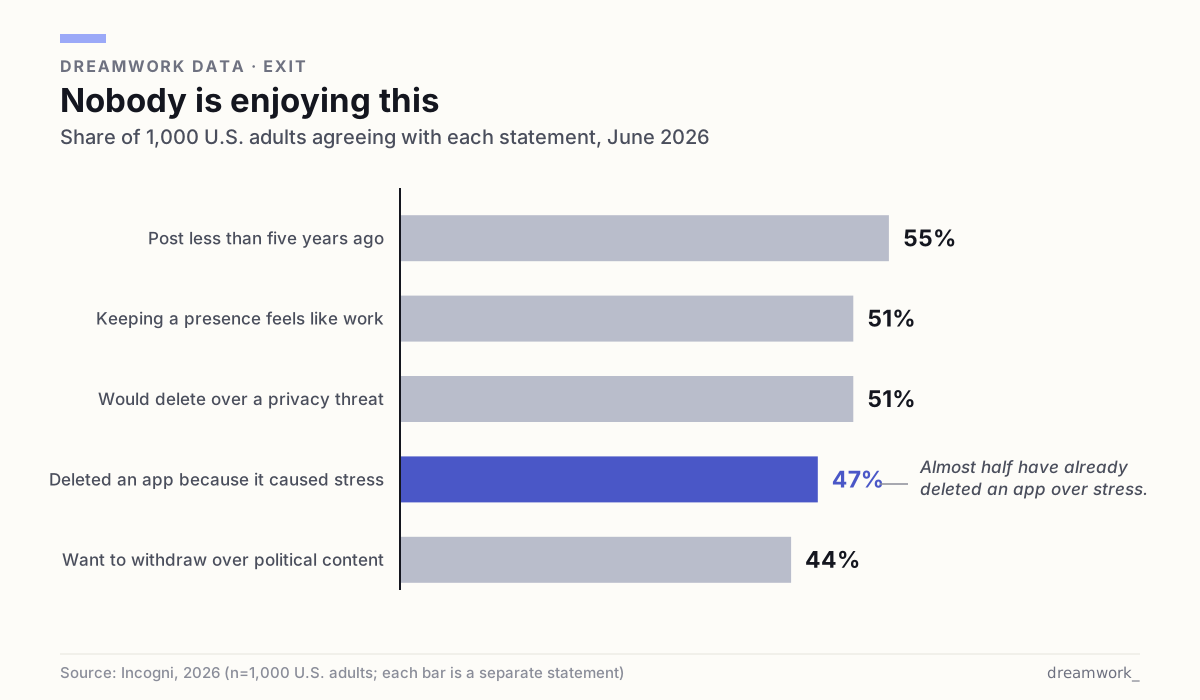
You are not unusual, and this is not only a LinkedIn problem. In a survey of 1,000 U.S. adults run in June 2026, 55% said they post less than they did five years ago, and 51% said maintaining an online presence feels like work (Incogni, 2026). Nearly half, 47%, have deleted a social or messaging app because it caused stress or anxiety. Privacy was the sharpest trigger of all: 51% said a privacy or security threat would make them delete an account outright, and 44% said political content makes them want to withdraw entirely.
Before the steps, one fact worth having. LinkedIn offers two different exits, and most people take the permanent one when they wanted the reversible one. Closing your account deletes it. Hibernating hides you completely and keeps everything intact (LinkedIn Help). Both make you invisible. Only one of them is undoable.
Do these three things before you close anything
Closing is fast and mostly irreversible, so the preparation matters more than the deletion itself. Three items, in this order.
- Download your data. On desktop, go to Settings and Privacy, then Data Privacy, then "Download your data" under How LinkedIn uses your data. A narrow category request arrives by email within minutes; the full archive takes up to 24 hours. The download link stays valid for 72 hours, so request it on a day you can actually act on it. This is not available on mobile.
- Cancel Premium, Sales Navigator, or Recruiter first. LinkedIn requires you to resolve a Premium membership before you can close the underlying Basic account. On desktop: the Me icon, then Premium features, then Manage subscription, then Purchases, then your active subscription, then Cancel subscription. A paid plan runs to the end of its billing cycle; a free trial ends immediately.
- Hand off anything you own. Groups you own and any association with an employer's enterprise account have to be resolved before closure. If your account is tied to an enterprise product, an administrator at that company has to remove you first.
One trap worth naming. If you bought Premium through the Apple App Store or Google Play, cancelling inside LinkedIn does nothing. You cancel with Apple or Google. And if you subscribed on iOS through the mobile web, LinkedIn processes the payment but the cancellation has to happen on desktop, not in the iOS app (LinkedIn Help). People discover this a month later, on a bank statement. If you are weighing whether the subscription was ever worth it, our breakdown of whether LinkedIn Premium pays off has the numbers.
How to close your LinkedIn account on desktop
This is the current flow, taken from LinkedIn's own closure help page. It takes under a minute once the preparation above is done.
- Click the Me icon at the top of your LinkedIn homepage
- Select Settings & Privacy from the dropdown
- Under Account management, click Change next to Close account
- Check the reason for closing your account and click Next
- Enter your account password and click Close account
How to close it from the mobile app
The mobile flow is genuinely different, not just a reskin. The setting lives under Account preferences rather than the desktop's settings root, and there is an extra confirmation tap.
- Tap your profile picture, then Settings, then Account preferences
- Tap Close account under Account management
- Tap Continue
- Tap the reason for closing your account and tap Next
- Enter your account password and tap Done
Two things the app cannot do. You cannot download your data from mobile, and LinkedIn's own hibernation page warns that on mobile "content may not appear where you expect it to be" and points you to desktop. If you want either the archive or the reversible option, use a browser.
What actually happens to your data
This is the part the step-by-step posts skip, and it is the part you probably care about most. LinkedIn publishes three separate clocks, and they do not run together.
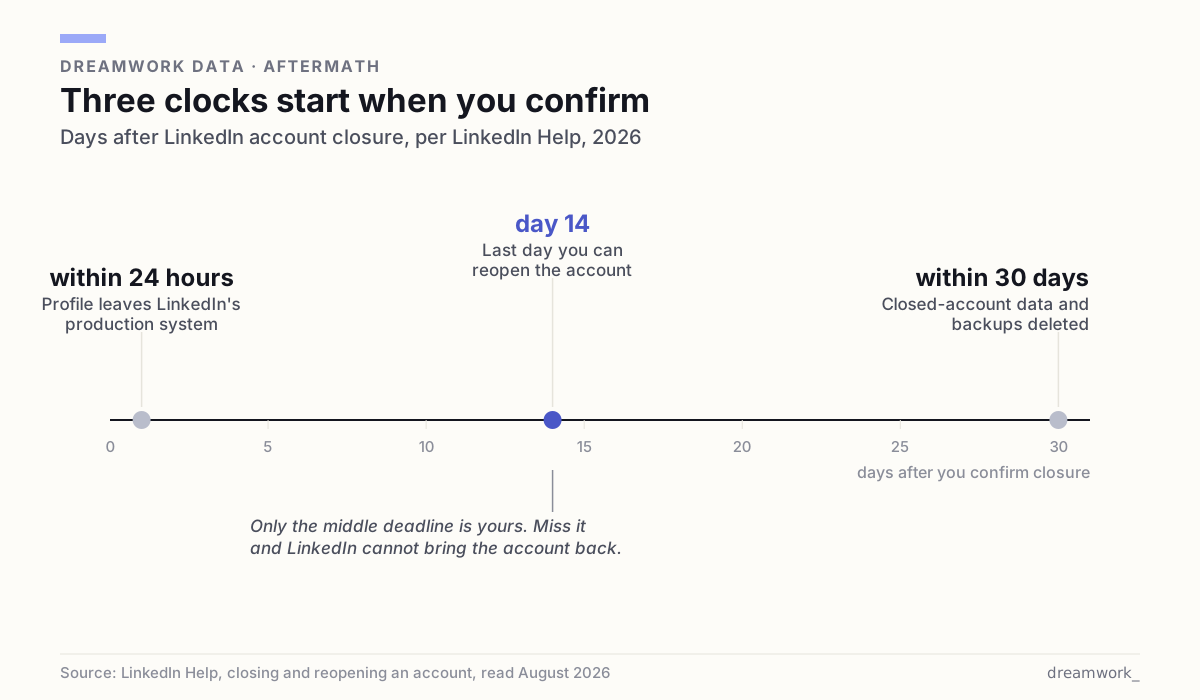
Within 24 hours, your information is removed from LinkedIn's production system and your personal data generally stops being visible to others. Within 30 days, LinkedIn says it deletes closed account information and de-identifies logs and backup information. Those are stated defaults, not guarantees for every byte.
Several things outlive the account, and LinkedIn says so plainly in its privacy policy. Information you shared with other people, including messages and group posts, "will remain visible after you close your account." LinkedIn retains de-personalized information indefinitely. It keeps personal data where it is reasonably necessary to comply with legal obligations, meet regulatory requirements, resolve disputes, or prevent fraud and abuse. And it does not control data other members already copied out of the service.
Then there is the search-engine tail. Your public profile can keep appearing in outside search results until those services refresh their own caches, and LinkedIn warns that changes to a public profile can take "several weeks or even months" to show up in Google, Bing, or Yahoo. Deleting your account does not scrub you from the internet on a schedule you set. It stops the flow of new information, and then you wait.
The 14-day window, and what it does not bring back
You get a grace period, and it is shorter than people assume. LinkedIn states it can reopen an account "if it's been closed less than 14 days" and that it is "unable to reopen accounts closed for more than 14 days." To use it, enter your registered email and password on the login page, click Reactivate, and finish through the confirmation email. The link in your original closure email works too.
Reopening is not a rollback. You get your connections back. You do not get back your endorsements and recommendations, your group memberships, your followings including companies and Top Voices, or any ignored and pending invitations. Ten years of colleagues vouching for you in writing are gone the moment you confirm, even if you change your mind an hour later.
That asymmetry is the strongest argument for reading the next section before you touch anything. If there is even a 10% chance you will want this profile back in a year, closure is the wrong tool. Recommendations take years to accumulate and one password entry to destroy.
Hibernate, the option most people actually want
LinkedIn calls hibernation "an alternative to closing" your account, and it does almost everything people imagine deletion will do. Your profile stops being visible to anyone, including your own connections, and it stops appearing in searches on the platform. Nothing is deleted.
On desktop: click your profile photo, select Settings & Privacy, choose Hibernate account under Account management, select a reason, then enter your password and confirm. To come back, you log in normally. The one restriction is that you can reactivate only 24 hours after hibernating, so it is not a switch you can flip twice in an afternoon.
Know the residue. While hibernated, your past messages, comments, and posts stay where they are, and recommendations and endorsements you gave others remain visible, all attributed to "A LinkedIn member" with a generic icon instead of your photo. An active Premium subscription is cancelled immediately when you hibernate (and if you pay Apple, you still have to cancel with Apple). Connection and follower counts can look wrong for up to 48 hours.
| Hibernate | Close | |
|---|---|---|
| Profile visible to others | No | No |
| Connections kept | Yes | Deleted, restored only if you reopen in 14 days |
| Endorsements and recommendations | Kept | Gone permanently |
| Messages you already sent | Stay, shown as "A LinkedIn member" | Stay visible to recipients |
| Premium subscription | Cancelled immediately | Must be cancelled before closing |
| Time limit | None. Reactivate after 24 hours | 14 days to reopen, then never |
If the problem is being watched, not LinkedIn itself
Most people who want out are reacting to a feeling of exposure: that a current employer can see them getting restless, that the whole network gets a notification when they change a job title, that browsing a competitor's team leaves footprints. Those are four separate settings, and turning them off costs you nothing.
- Hide your public profile. From your profile, edit "Public profile & URL" and toggle public visibility off. This governs what people who are not signed in to LinkedIn can see.
- Stop broadcasting edits. Under Settings, Visibility, then Visibility of your LinkedIn activity, switch off sharing job changes, education changes, and work anniversaries. Job updates otherwise reach your network within about two hours, education updates within a day.
- Browse without leaving a name. Settings, Visibility, then Profile viewing options offers your name and headline, semi-private characteristics, or full private mode. Private mode shows the other person only "LinkedIn Member", and the trade is that a free account browsing privately loses its own list of profile viewers.
- Set Open to Work to recruiters only. The public option adds the photo frame everyone can see, while the recruiters-only option is meant to exclude LinkedIn Recruiter users at your current company, though LinkedIn says outright that it "can't guarantee complete privacy".
Fifteen minutes in those four menus gets you most of the calm people are chasing when they type "delete account" into a search bar, and it keeps the connections. If the exhaustion runs deeper than settings, that is a different problem with different fixes, and our guide to job-search burnout treats it as one.
When deleting is the right call
Sometimes it is. Close the account if you are leaving professional networking entirely, if you have a duplicate profile splitting your history, if you are removing a public footprint for safety reasons, or if the account has been compromised past the point of trust. In those cases the permanence is the feature, and hibernation just leaves a hook in the water.
The case that deserves more scrutiny is the common one: deleting because LinkedIn makes you feel behind. That feeling is manufactured by a feed that shows you promotions and not the eleven months of applications behind them. LinkedIn publishes that about 8,200 job applications are submitted every minute across a membership it puts at more than 1.3 billion people. You are not losing a race. You are standing inside a very large room.
The practical point is that leaving LinkedIn does not have to mean leaving the job market. Openings are published in a lot of places, and you can search them without maintaining a profile that reports your movements back to people you work with. Dreamwork's live job board is browsable without an account, and our job-search how-to guides cover the parts of the process that never depended on a feed. If you close the tab for good, close it on purpose, with the archive downloaded and the subscription already cancelled.
Frequently asked questions
How do I permanently delete my LinkedIn account?
On desktop, click the Me icon, select Settings & Privacy, click Change next to Close account under Account management, choose a reason, then enter your password and click Close account. On mobile, tap your profile picture, then Settings, then Account preferences, then Close account. Cancel any Premium subscription first, because LinkedIn requires it to be resolved before the Basic account can close.
Can I recover my LinkedIn account after deleting it?
Yes, but only within 14 days. LinkedIn can reopen an account closed less than 14 days ago, and states it is unable to reopen accounts closed for longer. Log in with your registered email and password and click Reactivate, or use the link in your closure email. Your connections return, but endorsements, recommendations, group memberships, followings, and pending invitations do not.
What is the difference between hibernating and closing a LinkedIn account?
Hibernating hides your profile from everyone, including your connections, while keeping all your data; closing deletes the account. LinkedIn describes hibernation as an alternative to closing. You can reactivate a hibernated account any time after a 24-hour waiting period, with no deadline, while a closed account is gone permanently after 14 days.
How long does LinkedIn keep my data after I close my account?
LinkedIn says your information is removed from its production system within 24 hours and that it generally deletes closed account information and de-identifies logs and backups within 30 days. Some data outlasts that: messages and group posts you shared with others stay visible, de-personalized information is kept indefinitely, and personal data can be retained for legal, regulatory, security, and fraud-prevention reasons.
Do I need to cancel LinkedIn Premium before deleting my account?
Yes. LinkedIn requires a Premium membership to be resolved before you can close the underlying Basic account. Cancel on desktop through the Me icon, Premium features, Manage subscription, Purchases, then Cancel subscription. If you subscribed through the Apple App Store or Google Play, cancel with Apple or Google instead, because cancelling inside LinkedIn will not stop that billing.
Will deleting my LinkedIn account remove me from Google search results?
Not immediately, and not on a schedule you control. Your public profile can keep appearing in outside search results until those services refresh their caches, and LinkedIn warns that public profile changes can take several weeks or even months to show up in Google, Bing, or Yahoo. LinkedIn states it does not control how or when those services refresh.
Sources
- LinkedIn Help: Close and delete your LinkedIn account (desktop and mobile steps, what you lose, Premium and group prerequisites, 14-day reopen)
- LinkedIn Help: Reopen your account ("closed less than 14 days"; connections restored, endorsements and group memberships not)
- LinkedIn Help: Hibernate your LinkedIn account (alternative to closing, 24-hour reactivation wait, Premium cancelled immediately, "A LinkedIn member" attribution)
- LinkedIn Help: Data retention (removed from production within 24 hours; closed account information deleted and backups de-identified within 30 days)
- LinkedIn Privacy Policy: Data retention and deletion (shared messages and group posts remain visible, de-personalized data retained, legal and security exceptions)
- LinkedIn Help: Cancel LinkedIn Premium subscription (desktop and app steps, billing-cycle expiry, Apple and Google Play exceptions, iOS cancellation on desktop)
- LinkedIn Help: Download your account data (Data Privacy path, minutes versus 24 hours, 72-hour download link, desktop only)
- LinkedIn Help: Control your public LinkedIn profile (toggle public visibility off; search tools may take weeks or months to reflect changes)
- LinkedIn Help: Share profile updates with your network (turn off job, education, and work-anniversary broadcasts; two-hour and 24-hour propagation)
- LinkedIn Help: Who's viewed your profile visibility settings (name and headline, semi-private characteristics, private mode)
- LinkedIn Help: Browsing profiles in private and semi-private mode (free accounts browsing privately lose their own viewer list)
- LinkedIn Help: Let recruiters know you're Open to Work (All LinkedIn members versus Recruiters only; "we can't guarantee complete privacy")
- LinkedIn Help: Next steps to close and delete a LinkedIn account (enterprise account association must be removed by an administrator)
- Incogni: The great digital fatigue (June 2026 survey of 1,000 U.S. adults: 55% post less, 51% presence feels like work, 51% would delete over privacy, 47% deleted an app over stress, 44% withdraw over political content)
- LinkedIn Newsroom: About us statistics (more than 1.3 billion members; about 8,200 job applications submitted every minute)