ATS Resume Guide 2026: Make Any Resume Machine-Readable
You already have a resume. Here is exactly what breaks when software takes it apart — and how to fix it in ten minutes.
An ATS resume is an ordinary resume saved so hiring software can take it apart correctly. Use one column, standard headings, and plain text — no tables, sidebars, graphics, or content in the header or footer layer. Keep your name and contact details in the body, spell out acronyms, and upload a text-based PDF or .docx.
Your resume is probably fine. The file might not be.
Somewhere in the last decade, job seekers were handed a strange new obligation: write for a reader who is not a person. You no longer hand a document to a hiring manager. You upload a file to a database, and the database decides what your career looks like before anyone has an opinion about it.
Which means most resume advice aims at the wrong problem. You almost certainly do not need to rewrite your resume. You need to convert it — take the document you already have and make sure it survives being taken apart. That is a mechanical job. It takes about ten minutes. And almost nobody walks through it section by section, because fear sells better than a checklist.
If you want the background on what this software actually does, read our explainer on what an applicant tracking system is. If you would rather start clean than repair, take the free ATS-friendly resume template. This guide is the third case, and the most common one: you have a resume, you like it, and you want to know exactly what will break.
What "machine-readable" actually means
When you upload, the software does one narrow thing before anything else happens: it disassembles your document into fields. Name here. Employer there. Title, dates, skills, degree, location, each into its own slot. Everything you wrote either lands in a field or falls on the floor. Nothing is judging you yet. Something is filing you.
Filing matters because of what comes next. Recruiters do not read the pile — they query it. In Jobscan's February–March 2025 survey of 384 recruiters, over 99% use filters, and the fields they reach for first are precisely the ones a layout can scramble: skills (76.4%), education (59.7%), job title (55.3%), certifications (50.6%), years of experience (44%), and location (43.4%).
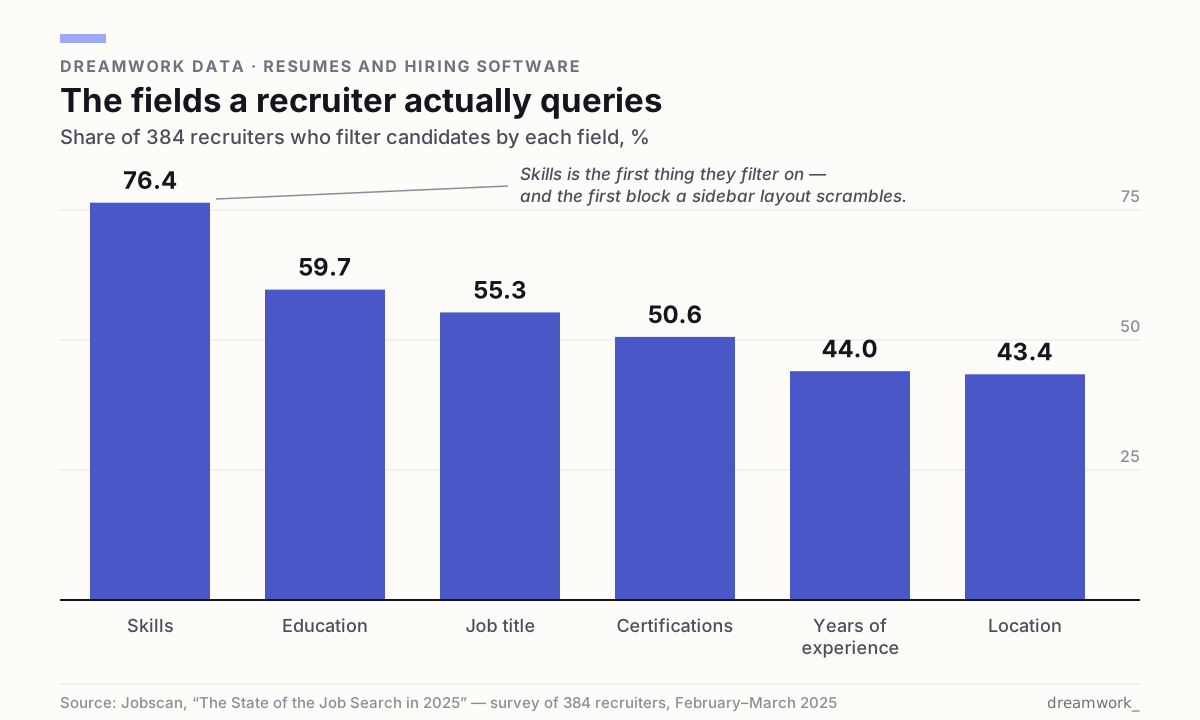
Read that as a checklist, not trivia. Six fields. If one of them lands in the wrong slot — your job title fused to a company name, your skills stranded in a sidebar the reader skipped past — you are not rejected. You are missing from the search that would have found you, and no one, including you, ever learns why.
The four things that most often break parsing
The failure modes are boringly consistent. They are also, mercifully, all visible to your own eyes in about ninety seconds.
- Columns, tables, and sidebars. This is the big one. A 2025 research paper on resume information extraction estimates that roughly 20% of resumes use non-linear, multi-column layouts that break the standard top-to-bottom, left-to-right reading flow. Switching off that paper's layout-handling step cost about ten percentage points of accuracy on long descriptive fields — your bullet points, the part that proves you can do the work. A two-column design is the most common self-inflicted wound in the job search.
- Headers and footers. In a word processor these are a separate layer of the document, and readers routinely ignore that layer. The University of Utah's career office is blunt: "Do not use the add header or footer feature in Word – this extra information is difficult for the ATS to parse." Put your name and phone number up there and you can arrive as an anonymous record with a great work history.
- Text rendered as a graphic. Skill-rating bars, competency wheels, icons, logos, a headshot. Jobscan's formatting guidance is direct: charts showing skill levels are unreadable, and you should write "Java (Expert)" as plain text instead. A picture of a fact is not a fact anything can store.
- Nonstandard section headings. "My Journey." "What I Bring." "The Toolkit." The reader uses known labels to decide where a block of text belongs, so an invented heading can file your work experience under education, or under nothing. Utah's guidance says the same thing: avoid creative headings, they confuse the software.
There is a fifth, quieter one worth knowing about. Decorative or custom fonts can come back as null characters and symbol soup, turning a clean page into gibberish on the other side. It is uncommon. It is also unrecoverable, and you will never be told.
The conversion pass, section by section
Open the resume you already have and work down the page. You are not rewriting. You are flattening — turning a designed object back into a document.
- The top block. Your name goes on the first line of the body, as ordinary text, largest on the page. Contact details go on the line beneath it, separated by pipes or middle dots. Nothing lives in the header layer. Failure mode: a nameless record.
- Summary. Two or three plain sentences, no text box, no shaded panel. Name the role you are applying for in the first line. Failure mode: a text box that never gets read.
- Skills. A comma-separated list under a heading that literally says Skills. Not a grid or a rating bar. Spell out acronyms beside the full term — "Search Engine Optimization (SEO)" — so both forms are searchable. Failure mode: the most-filtered field on your resume, unsearchable.
- Experience. One entry per job, always the same shape: employer, location, and dates together on one line, the role title on the next, then bullets. Keep every entry in that identical order — the consistency is what lets the software count your tenure. Never let a date drift into its own floating column on the right of the page; that is the single most common way a date gets detached from the job it belongs to. Failure mode: two jobs merged into one, or a tenure it cannot count.
- Education. Degree spelled out plus its abbreviation, then school, location, and date. One line. Failure mode: a degree filter you would have cleared.
- Certifications and projects. Same pattern, one line per item, full name plus acronym. Half of recruiters filter on certifications, so do not bury a license in a sentence.
Then one free quality check: select all, copy, and paste the finished file into a blank plain-text document. What you see is roughly what the software sees. If the order is scrambled or two jobs have collided, that is your resume — not a preview of it.
The file you upload
File format is the question people worry about most and the one that matters least — as long as you avoid the one real trap, which is an image. Indeed's career guide lists .doc, .docx, .pdf, .rtf, .html, and .odt as commonly accepted, and notes that most applicant tracking systems cannot read image-based files like .jpeg. Utah's guidance agrees: save as a PDF, and make sure "the PDF is text-based and not an image, as some ATS cannot read images."
- If the posting names a format, use it. That instruction usually exists because someone's system had a problem with the alternative.
- Otherwise, a text-based PDF or a .docx are both fine. If you can select and copy the text in your PDF, so can the software.
- Never upload a photo or a scan of a resume. No text underneath means no fields, and no fields means no record.
- Name the file plainly — FirstName-LastName-Resume — so it stays identifiable if it gets separated from your application.
Now the over-correction, because it is spreading: some advice tells you to strip everything down to a .txt file to be safe. Do not volunteer that. Plain text is what a recruiter requests when they are hunting for hidden keywords — talent-assessment firm Cangrade recommends asking for .txt precisely because it "strips away design elements that enable formatting tricks." It is a forensic tool, not a submission standard, and flattening your resume into an undifferentiated wall removes the structure that tells the software where a section begins.
The advice that will waste your afternoon
There is a whole industry selling protection from a threat it partly invented. Four pieces of standard advice are worth refusing outright.
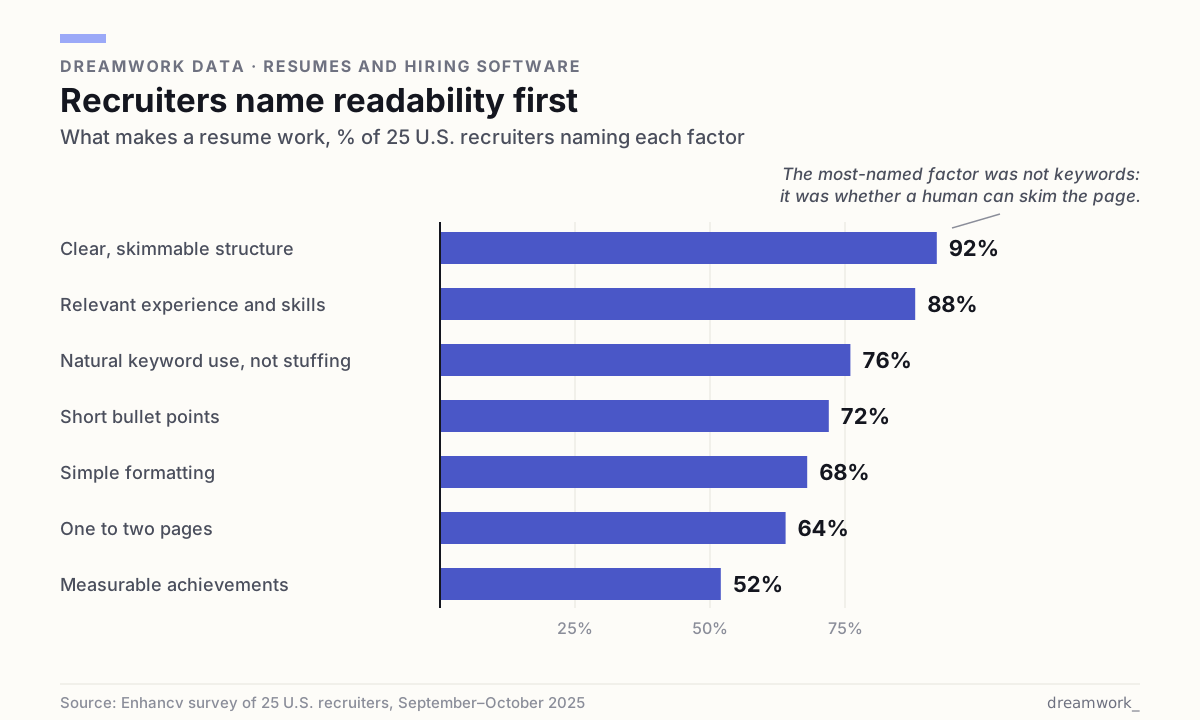
- Stuffing keywords to hit a number. When Enhancv asked 25 U.S. recruiters in late 2025 what makes a resume work, the item they named was "natural keyword use, not stuffing" — 76% of them, framed as the opposite of cramming. Mirroring a posting's real language for skills you actually have is good practice. Repeating a phrase eleven times is a tell.
- "ATS score" checkers. No universal score exists. Every employer configures its software differently and searches for different terms, so a tool grading you against one imaginary standard is measuring nothing that exists in any real inbox. The precision of the number is the whole product.
- White text and hidden prompts. This one actively hurts you. Parsing strips formatting, so hidden text simply appears as visible text on the other side. Recruiter Mike Peditto told Built In in October 2025 that recruiters "almost always eliminate candidates who try to embed hidden text," and added the line that ends the debate: "If you have to hide the keywords in white font, it means you didn't have them anywhere already in black font to talk about."
- The "75% get auto-rejected" panic. The figure traces to a 2012 sales pitch by a resume-optimization company that folded the following year, with no study or methodology ever published. In Enhancv's September–October 2025 survey, 23 of 25 recruiters — 92% — said their systems do not auto-reject resumes for formatting, design, missing keywords, or AI match scores. Only two had configured any content-based automatic rejection at all.
One automatic no is entirely real, and it gets almost no attention. All 25 recruiters in that survey said they use knockout questions: work authorization, required certifications, location. Those are the screening questions you click through in a hurry at the end of an application. That is where instant rejection actually lives. Answer them slowly.
The ten-minute conversion, in order
If you do nothing else in this guide, do this, top to bottom, on the resume you already have.
- Collapse every column, sidebar, and table into a single stream that reads straight down the page.
- Move your name and contact details out of the header or footer layer and into the first two lines of the body.
- Delete images, logos, icons, photos, and skill bars; rewrite whatever they conveyed as plain text.
- Rename invented headings to the standard set: Summary, Skills, Experience, Education, Certifications.
- Make every date follow one identical format, and keep the precision you actually have — if a role is recorded as "2022 – 2024", leave it; never invent a month to match a neighbouring entry.
- Swap decorative fonts and custom symbols — arrows, checkmarks, stars — for a common font and an ordinary bullet or hyphen.
- Spell out every acronym beside its full term, once.
- Copy the finished document into a blank plain-text file and read what comes out. That is the real test.
- Save as a text-based PDF or .docx, named FirstName-LastName-Resume, and check the posting for a required format.
One note, since we build the thing: when Dreamwork tailors your resume to a specific role, it applies this entire checklist by default. One column. Your name and contact details as real text at the top of the body, never in a header layer. Headings from the standard set. Acronyms spelled out beside their full terms. Every date kept in the precision your original actually used and locked to the entry it belongs to. No images, icons, or skill bars. A text-based PDF, named after you rather than after the tool. The keywords it mirrors come from the posting, and only where they are genuinely true of you — the rules above are the rules it follows.
Readable is the floor, not the ceiling
Machine-readability buys you exactly one thing: existence. It does not make you the strongest candidate. It makes you a candidate at all — a complete record a recruiter can find when they search for someone like you. That is a low bar, and it is startling how many good people fail it for reasons no one ever tells them.
The bar is not going to get lower. In SHRM's December 2025 survey of 1,722 HR professionals, 39% of organizations reported using AI somewhere in HR, and recruiting was the most common use at 27% — well ahead of every other function. Meanwhile the volume climbs: recruiters in the Enhancv study described 400 to 600 applicants for entry-level openings and 2,000 or more for remote engineering roles. A clean file is the cost of being counted.
So spend ten minutes on the conversion, then stop thinking about it forever. Put your energy where the odds actually move — into roles you genuinely fit, where the words you mirror are words you honestly own. You can browse open roles to see the language real postings use, and our how-to library covers what comes next. The software was never your opponent. It was a door with a narrow frame, and you have been carrying the furniture sideways.
Frequently asked questions
What is an ATS resume?
An ATS resume is an ordinary resume formatted so hiring software can disassemble it into database fields without errors. In practice that means one column, standard section headings, plain bullets, no tables or graphics, no content in the header or footer layer, and a text-based PDF or .docx file. It is a formatting standard, not a different document.
How do I make my existing resume ATS-friendly?
Collapse columns and sidebars into a single stream, move your name and contact details out of the header layer, delete images and skill bars, rename creative headings to Summary, Skills, Experience and Education, make your dates consistent, and spell out acronyms. Then copy the file into a blank plain-text document — if it still reads correctly, you are done.
Do two-column resumes really fail?
They are the most common cause of scrambled parsing. A 2025 resume-extraction paper estimates roughly 20% of resumes use non-linear multi-column layouts that break the normal top-to-bottom, left-to-right reading flow, and reports that removing layout handling cost about ten points of accuracy on long descriptive fields — the bullets that describe your actual work.
Should I submit a PDF, a Word file, or plain text?
Follow the posting when it names a format. Otherwise a text-based PDF or a .docx both work; commonly accepted formats also include .rtf, .html and .odt, per Indeed's career guide. Never upload an image or scan. Avoid volunteering plain .txt — it strips the structure that helps both the software and the human reading you.
Does an ATS automatically reject my resume?
Rarely for formatting. In Enhancv's September–October 2025 survey, 23 of 25 U.S. recruiters said their systems do not auto-reject on formatting, design, missing keywords, or AI match scores. What does reject you automatically is the knockout questionnaire — work authorization, certifications, location — which all 25 said they use.
Is there a real ATS score I should aim for?
No. Employers configure their software differently and search for different terms, so no universal score exists and no third-party tool can measure one. Aim instead for a file that parses cleanly and reads as a clear fit in a few seconds — that is what recruiters described when asked what makes a resume work.
Sources
- Jobscan — The State of the Job Search in 2025 (survey of 384 recruiters; filter fields; Fortune 500 adoption)
- Jobscan — ATS Resume Formatting Mistakes to Avoid (columns, headers and footers, skill graphics, custom fonts, creative headings)
- Enhancv — Does the ATS Reject Your Resume? 25 Recruiters Explain What Really Happens (September–October 2025)
- Zhu et al. — Layout-Aware Parsing Meets Efficient LLMs: A Unified, Scalable Framework for Resume Information Extraction and Evaluation (arXiv, October 2025)
- University of Utah Career Success — How to Create an ATS-Friendly Resume
- Indeed Career Guide — Best Resume File Formats (commonly accepted formats; image-based files)
- Built In — Your AI Resume Hacks Probably Won't Fool Hiring Algorithms (October 2025)
- Cangrade — White Fonting: What It Is, Why It's Risky, and How Employers Should Respond
- SHRM — The State of AI in HR 2026 (survey of 1,722 HR professionals, December 2025)
- The Interview Guys — The ATS Resume Rejection Myth (origin of the 75% claim)